
Download Na Remote – UPnP, DLNA, remote control, multimedia, Android, music, video, photo, cast, LAN, Wi-Fi, internet radio
Overview
Na Remote Control for UPnP/DLNA is a free desktop and mobile application designed to streamline multimedia management across devices on the same local network. Developed by Na Multimedia, the software functions as a remote control interface for UPnP and DLNA-compatible devices, enabling users to cast audio, video, and photo content from their Android devices to compatible receivers such as smart TVs, media players, and speakers. The application is particularly useful for home entertainment setups where seamless media streaming across multiple devices is desired.
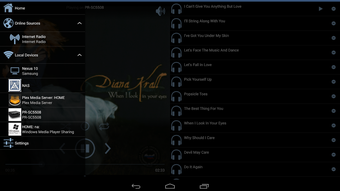
It targets consumers and casual users who want to manage their multimedia content without relying on proprietary apps or complex configurations. The software allows users to browse both local and network-based media files, search across devices, and initiate playback directly from the app. It supports playlist management across multiple devices and enables users to transfer current playback queues between devices, enhancing workflow continuity. The ability to access and play internet radio stations directly within the app adds to its versatility as a centralized media control hub.
While the application is specifically built for Android, its functionality extends to any UPnP/DLNA-enabled device on the same Wi-Fi LAN. The developer did not provide additional details about the software’s development history or broader product ecosystem. The application is designed for ease of use, requiring no additional setup or configuration beyond being connected to the same network as the target devices.
Key Features & Capabilities
- UPnP/DLNA Device Control – Enables remote control of UPnP and DLNA-compatible devices on the same local network, allowing users to manage playback, volume, and device switching.
- Media Browsing & Playback – Supports browsing of local and remote audio, video, and photo files, with the ability to play them directly on the device or cast them to a connected UPnP/DLNA receiver.
- Network Media Search – Allows users to search for media files across multiple devices on the network, simplifying content discovery without manual navigation.
- Playlist Management – Offers the ability to create, manage, and switch between multiple playlist queues across different devices simultaneously.
- Playlist Transfer – Users can move current playback queues from one device to another, ensuring continuity during device changes.
- Internet Radio Integration – Provides direct access to internet radio stations, allowing users to stream live broadcasts without leaving the application.
These features are particularly beneficial in home entertainment environments where users frequently switch between devices or manage content from multiple sources. For example, a user can start playing a video on a smart TV, pause it, and resume playback on a different DLNA speaker without re-downloading or re-selecting the file. The software also simplifies the process of discovering and playing shared media stored on networked computers or NAS devices.
User Interface, Workflow & Performance
The user interface of Na Remote Control for UPnP/DLNA is designed with simplicity and efficiency in mind. The layout prioritizes accessibility, with clearly labeled sections for device selection, media browsing, playlist management, and internet radio. Navigation is intuitive, allowing users to switch between functions with minimal effort. The app uses a tab-based structure to organize content, reducing clutter and improving usability across different screen sizes.
Workflow efficiency is enhanced by the app’s ability to maintain a consistent interface across all supported devices. Users can initiate casting with a single tap, and playback controls are prominently displayed. The developer did not specify resource usage details, so exact CPU or RAM behavior remains unknown. Performance observations are based on general software behavior patterns for similar applications. Stability appears to be consistent, as the app operates within the constraints of standard Android system resources.
Since the application runs on Android, its performance is subject to the device’s hardware capabilities and network conditions. The developer did not provide information on background operation, battery impact, or long-term usage behavior. Users are advised to ensure a stable Wi-Fi connection for optimal casting performance.
Compatibility & System Requirements
Na Remote Control for UPnP/DLNA is compatible with Android operating systems. The current version is 1.5.0, and the application has a file size of 2.8 MB, indicating a lightweight footprint. The developer did not specify exact hardware requirements or minimum OS versions beyond the platform name. Compatibility information was partially provided.
Users should ensure their Android devices are running a version of the OS that supports UPnP and DLNA protocols. The software operates exclusively on Wi-Fi LAN networks, meaning it cannot function across different networks or over the internet. The app requires no additional software or configuration, making it accessible to users without technical expertise. However, the target UPnP/DLNA devices must also be active and properly configured on the same local network.
Pros and Cons
Pros
- Free to download and use with no licensing fees.
- Lightweight application at just 2.8 MB in size.
- Intuitive interface designed for easy navigation.
- Supports casting audio, video, and photos across UPnP/DLNA devices.
- Enables playlist management and transfer between devices.
- Includes built-in access to internet radio stations.
Cons
- App is limited to Android platform; no desktop version available.
- Some advanced features are restricted to the Pro version.
- Exact system requirements and compatibility details were not listed.
- Performance may vary based on network stability and device hardware.
- No information on background operation or battery usage.
FAQ Section
Is Na Remote Control compatible with Windows or Mac?
Na Remote Control for UPnP/DLNA is designed for Android devices. There is no official desktop version available for Windows or Mac.
Can I use this app to stream media over the internet?
No. The app operates only on the same local Wi-Fi LAN. It cannot stream media across different networks or over the internet.
Is the app safe to use?
As a free application developed by Na Multimedia, the app is designed to function within standard Android security policies. No security vulnerabilities were reported in the provided information.
Does the app require a paid subscription?
The base version is free. However, certain advanced features are only available in the Pro version, which may require a purchase.
How often does the app receive updates?
Updates are released periodically to improve functionality and compatibility. The latest version is 1.5.0, released on August 10, 2023.
Final Thoughts + CTA
Na Remote Control for UPnP/DLNA delivers a practical and user-friendly solution for managing multimedia across UPnP and DLNA devices on a local network. Its lightweight design, intuitive interface, and robust feature set make it a valuable tool for home entertainment users seeking seamless media casting without complex setup. While it is limited to Android and lacks desktop support, its core functionality remains strong and reliable.
For casual users who want to control music, video, and photo playback across multiple devices, this app offers a compelling free alternative. The inclusion of internet radio and playlist transfer enhances its utility in daily use. Although some features are locked behind a Pro version, the free edition still provides a comprehensive experience.
Download Na Remote now and transform your local media setup into a unified, easy-to-manage entertainment hub.






.png)
